
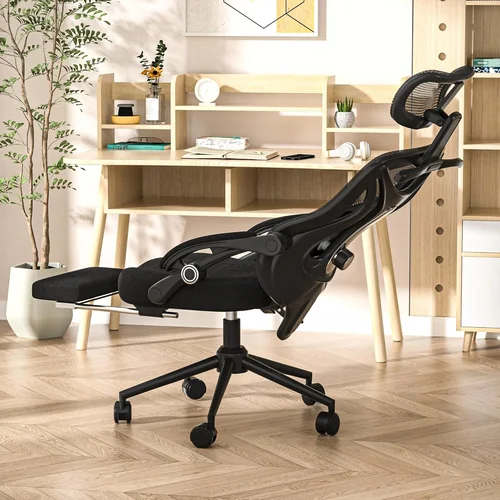
Ergonomic chairs have become essential furniture in modern homes, especially as remote work and long hours spent at desks have become the norm. Whether you’re working from home, gaming, studying, or simply relaxing with a book or laptop, the chair you sit in can have a profound impact on your posture, comfort, and long-term health. Poor seating choices often lead to back pain, neck strain, fatigue, and even chronic musculoskeletal issues—problems that are both preventable and increasingly common. That’s why investing in a high-quality ergonomic chair isn’t just a luxury; it’s a necessity for anyone who spends significant time seated.
This comprehensive buying guide is designed to help you navigate the crowded and often confusing market of home office chairs. With hundreds of models available—ranging from budget-friendly options under $100 to luxury designs costing over $1,500—it’s easy to feel overwhelmed. Our goal is to cut through the noise and provide you with expert-level insights, practical advice, and actionable recommendations based on real-world use, ergonomic science, and user feedback. By the end of this guide, you’ll understand exactly what to look for, how to avoid common pitfalls, and which chairs offer the best value for your specific needs and budget.
The ergonomic chair market has evolved dramatically over the past decade. What was once dominated by bulky, industrial-style office chairs has now expanded to include sleek, modern designs that blend seamlessly into home environments. Brands like Herman Miller, Steelcase, and Humanscale have long set the gold standard, but newer entrants like Autonomous, Branch, and Sihoo are making high-performance ergonomics more accessible than ever. Whether you’re furnishing a dedicated home office or upgrading your living room setup, there’s never been a better time to invest in a chair that supports your body the way it deserves.

What to Look for When Buying Buying Guide
1. Lumbar Support
Lumbar support is arguably the most critical feature of any ergonomic chair. The lumbar region—your lower back—naturally curves inward, and prolonged sitting without proper support can flatten this curve, leading to discomfort, muscle fatigue, and even disc compression over time. A good ergonomic chair should provide adjustable lumbar support that conforms to the natural shape of your spine.
Look for chairs with adjustable lumbar height and depth. Fixed lumbar pads may work for some, but they often don’t accommodate different body types. High-end models offer dynamic lumbar support that moves with you as you shift positions, maintaining consistent pressure and alignment. Some chairs even feature dual lumbar systems or inflatable bladders for personalized contouring. Avoid chairs with no lumbar support or those that only offer a thin cushion—these do little to prevent slouching or spinal misalignment.
2. Seat Design and Cushioning
The seat is where your body spends most of its time, so its design and material matter immensely. A well-designed seat should distribute your weight evenly, reduce pressure on the hips and thighs, and promote healthy circulation. Look for a seat with a waterfall front edge—this gently slopes downward to prevent pressure on the back of your knees and improve blood flow.
Cushioning should be firm enough to support your weight without bottoming out, but soft enough to remain comfortable over long periods. High-density foam is ideal, as it retains its shape over time. Memory foam can be comfortable initially but may retain heat and degrade faster. Mesh seats are popular for breathability, especially in warmer climates, but ensure the mesh is taut and supportive. Avoid overly soft or thin cushions, which can cause you to sink in and lose proper posture.
3. Adjustability
One-size-fits-all doesn’t work when it comes to ergonomic chairs. The ability to customize your chair to your body and workspace is essential for long-term comfort and health. Key adjustable features include seat height, seat depth, armrests, backrest recline, and tilt tension.
Seat height should allow your feet to rest flat on the floor with knees at a 90-degree angle. Seat depth should support your thighs without pressing against the back of your knees—ideally, there should be 2–4 inches of space between the edge of the seat and your knees. Armrests should be height-adjustable and, ideally, width- and angle-adjustable to support your arms without forcing your shoulders up. Recline functionality allows you to shift positions throughout the day, reducing spinal pressure. Look for chairs with synchronous tilt mechanisms, which move the seat and backrest together in a coordinated motion, promoting natural movement.
4. Breathability and Material
Material choice affects both comfort and durability. Mesh is the most breathable option, making it ideal for hot climates or long work sessions. It allows air to circulate, reducing heat buildup and moisture. However, not all mesh is created equal—high-quality mesh should be durable, stretch-resistant, and supportive. Fabric upholstery offers a softer feel and comes in a variety of colors and textures, but it can trap heat and may stain or wear over time. Leather and faux leather provide a premium look but are less breathable and can become sticky in warm environments.
Consider your climate and usage habits. If you live in a humid area or tend to get warm while working, mesh is usually the best choice. For cooler environments or if you prefer a plush feel, fabric may be more suitable. Always check the quality of the material—cheap mesh can sag, and low-grade fabric can pill or tear.
5. Build Quality and Durability
A chair is a long-term investment, so build quality should be a top priority. Look for chairs made with robust materials such as aluminum, reinforced plastic, or high-grade steel. The base should be sturdy—five-point aluminum or nylon bases are standard and provide excellent stability. Casters should roll smoothly and be appropriate for your flooring: soft rubber wheels for hardwood or tile, hard plastic for carpet.
Check the weight capacity and ensure it exceeds your body weight by a comfortable margin. A higher weight limit often indicates stronger construction. Also, examine the stitching, joints, and moving parts. Loose screws, wobbly arms, or creaky mechanisms are red flags. Reputable brands often use rigorous testing standards, so look for certifications like BIFMA (Business and Institutional Furniture Manufacturers Association), which ensures the chair meets safety and durability benchmarks.
6. Size and Fit
Not all chairs fit all body types. A chair that’s too small can cause discomfort and poor posture, while one that’s too large may not provide adequate support. Consider your height, weight, and body proportions when choosing a chair.
Most chairs are designed for users between 5’2″ and 6’2″, but some models offer extended height ranges or wider seats for larger individuals. If you’re on the taller or shorter end of the spectrum, look for chairs with adjustable seat depth and taller backrests. Some premium chairs even offer custom sizing. Always check the manufacturer’s size recommendations and, if possible, test the chair in person or take advantage of generous return policies.
7. Brand Reputation and Reviews
Brand reputation can be a strong indicator of quality and customer service. Established brands like Herman Miller, Steelcase, and Humanscale have decades of experience in ergonomic design and are known for their reliability. However, newer brands like Autonomous, Branch, and Sihoo have disrupted the market with innovative designs and competitive pricing.
Read user reviews from multiple sources—Amazon, Reddit, office furniture forums, and professional review sites. Pay attention to recurring themes: Is the lumbar support consistently praised? Do users report durability issues after a year? Are customer service responses timely and helpful? Avoid relying solely on marketing claims. Real-world feedback is often the most honest indicator of a chair’s performance.
8. Warranty and Customer Support
A strong warranty is a sign that a manufacturer stands behind its product. Most reputable ergonomic chairs come with warranties ranging from 1 to 12 years, covering defects in materials and workmanship. Herman Miller, for example, offers a 12-year warranty on many of its chairs, while Steelcase provides up to 10 years.
Check what the warranty covers: Does it include the frame, gas lift, armrests, and mechanisms? Is labor included for repairs? Also, consider the availability of replacement parts and the ease of contacting customer support. A long warranty is only valuable if the company honors it promptly. Read the fine print and look for brands with a track record of responsive service.
Different Types of Buying Guide

Common Buying Mistakes to Avoid
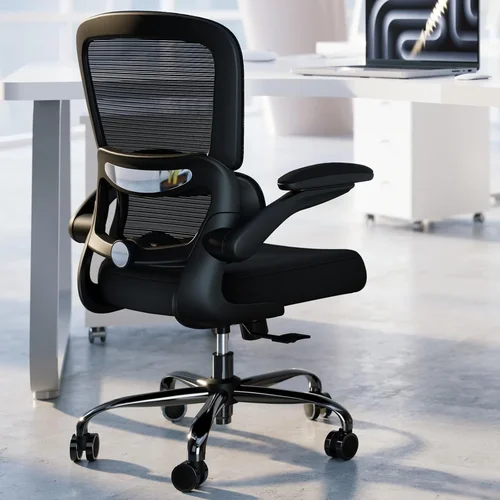
❌ Mistake: Prioritizing Style Over Function
Why it’s bad: A chair that looks great but lacks proper support can lead to discomfort and long-term health issues. Many stylish chairs sacrifice ergonomics for aesthetics, offering minimal adjustability and poor lumbar support.
What to do instead: Focus on ergonomic features first. Choose a chair that supports your spine, allows for movement, and fits your body. You can still find stylish options—many modern ergonomic chairs blend form and function beautifully.
❌ Mistake: Ignoring Adjustability
Why it’s bad: A non-adjustable chair may feel comfortable for a few minutes, but it won’t adapt to your changing posture or workspace setup. Over time, this can lead to strain and fatigue.
What to do instead: Look for chairs with multiple adjustment points: seat height, depth, armrests, lumbar support, and recline. The more customizable, the better it will suit your needs.
❌ Mistake: Buying Based on Price Alone
Why it’s bad: The cheapest chair isn’t always the best value. Low-cost models often use inferior materials, lack durability, and offer minimal ergonomic support, leading to early replacement.
What to do instead: Consider the cost per year of use. A $300 chair that lasts 5 years is better value than a $100 chair that breaks in 18 months. Invest in quality where it matters.
❌ Mistake: Overlooking Return Policies
Why it’s bad: Ergonomic comfort is highly personal. What works for one person may not work for another. Without a trial period, you risk being stuck with an uncomfortable chair.
What to do instead: Choose retailers or brands that offer at least a 30-day return policy. Some, like Autonomous and Branch, offer 100-day trials. Test the chair in real-world conditions before committing.
❌ Mistake: Neglecting Floor Compatibility
Why it’s bad: Using the wrong casters can damage your flooring or make the chair difficult to move. Hard plastic wheels on hardwood can scratch, while soft rubber on carpet may not roll smoothly.
What to do instead: Match your casters to your flooring. Most chairs allow caster replacement, so you can swap them out if needed. Consider purchasing a chair mat for added protection.
❌ Mistake: Assuming All Mesh Chairs Are Equal
Why it’s bad: Low-quality mesh can sag, stretch, or tear over time, losing its supportive properties. Some mesh chairs feel flimsy and offer little back support.
What to do instead: Look for chairs with high-tension, multi-layered mesh. Test the firmness by pressing down—it should feel supportive, not spongy. Read reviews to see how the mesh holds up over time.
❌ Mistake: Forgetting About Long-Term Use
Why it’s bad: A chair that feels great on day one may not hold up after months of daily use. Wear and tear on mechanisms, foam, and fabric can degrade comfort and support.
What to do instead: Choose chairs from brands with strong warranties and positive long-term reviews. Look for replaceable parts and durable construction.
Budget Guidelines: How Much Should You Spend?
Ergonomic chairs span a wide price range, and understanding what you get at each tier can help you make a smarter investment. Here’s a breakdown of what to expect based on budget:
Entry-Level ($50–$150): These chairs are often basic task chairs with limited adjustability and minimal lumbar support. Materials may be thin or low-density, and durability is typically poor. Best for occasional use or temporary setups, but not recommended for daily 8-hour work sessions. Examples include basic office chairs from Walmart or IKEA.
Mid-Range ($150–$400): This is the sweet spot for most home users. Chairs in this range offer solid ergonomic features—adjustable lumbar support, seat height and depth, and breathable mesh or fabric. Brands like Sihoo, Hbada, and Flash Furniture offer excellent value here. These chairs are suitable for full-time remote work and provide good durability for the price.
Premium ($400–$800): These chairs deliver advanced ergonomics, high-quality materials, and superior build quality. You’ll find features like synchronous tilt, 4D armrests, dynamic lumbar support, and reinforced frames. Models from Autonomous, Branch, and Steelcase fall into this category. Ideal for professionals who spend long hours at their desk and want lasting comfort.
Luxury ($800+): Top-tier chairs like the Herman Miller Aeron, Steelcase Leap, or Humanscale Freedom represent the pinnacle of ergonomic design. They offer unparalleled adjustability, innovative materials, and decades of research-backed engineering. These chairs are built to last 10–15 years and are often used in corporate environments. While expensive, they offer the best long-term value for serious users.
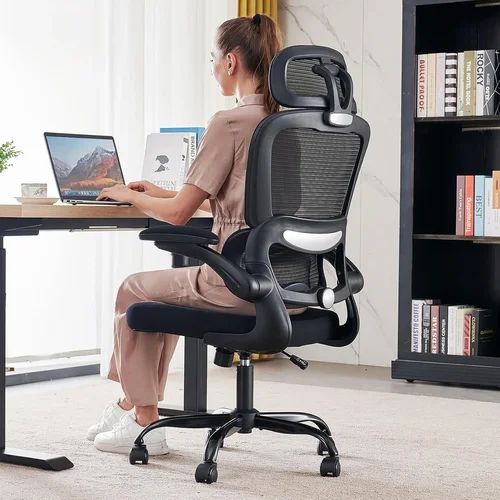
Expert Tips for Getting the Best Deal
Getting the right ergonomic chair doesn’t have to mean overspending. With smart shopping strategies, you can find a high-quality chair that fits your budget and needs. Here are expert-backed tips to help you save money and avoid regrets:
- Shop During Sales Events: Major retailers and brands often run promotions during Black Friday, Cyber Monday, Amazon Prime Day, and back-to-school season. Herman Miller and Steelcase occasionally offer discounts on certified pre-owned models. Sign up for newsletters to get early access to deals.
- Compare Online and In-Store Options: While online shopping offers convenience and a wider selection, visiting a furniture store lets you test chairs in person. Use showrooms to try models, then compare prices online. Some retailers price-match, so you can get the best of both worlds.
- Look for Bundle Deals: Some brands offer discounts when you buy a chair with a desk or accessories. Autonomous, for example, frequently bundles chairs with standing desks at a reduced rate.
- Check Return and Trial Policies: A generous return window (60–100 days) gives you time to test the chair in your actual workspace. Avoid brands with restocking fees or short trial periods.
- Read the Warranty Fine Print: A long warranty is only valuable if it’s easy to use. Look for brands that offer free shipping for repairs and clear instructions for claims.
- Consider Refurbished or Open-Box Models: These can save you 20–40% off retail prices. Ensure they come with a warranty and are inspected by the manufacturer.
- Use Cashback and Rewards Programs: Websites like Rakuten or credit card reward programs can give you 2–10% back on large purchases. Stack these with sales for maximum savings.
- Don’t Rush: Take your time to research and test. A chair is a long-term investment—rushing can lead to buyer’s remorse.

Frequently Asked Questions
Q: How long should an ergonomic chair last?
A: A high-quality ergonomic chair should last at least 5–10 years with regular use. Premium models from brands like Herman Miller or Steelcase can last 12–15 years or more with proper care. Look for chairs with strong warranties as an indicator of expected lifespan.
Q: Can I use an ergonomic chair on carpet?
A: Yes, but you’ll need the right casters. Hard plastic wheels are designed for carpet and will roll smoothly. If your chair comes with soft rubber wheels for hardwood, consider replacing them with carpet-specific casters for better mobility.
Q: Are gaming chairs ergonomic?
A: Many gaming chairs prioritize style and short-term comfort over true ergonomics. While some offer lumbar and neck pillows, they often lack adjustable lumbar support and proper seat depth. For long work sessions, a dedicated ergonomic task chair is usually a better choice.
Q: Do I need a footrest with my ergonomic chair?
A: If your feet don’t rest flat on the floor when the chair is at the correct height, a footrest can improve circulation and reduce leg fatigue. It’s especially helpful for shorter users or those with higher desks.
Q: Can an ergonomic chair help with back pain?
A: Yes, a properly adjusted ergonomic chair can reduce back pain by supporting the natural curve of your spine, promoting good posture, and reducing pressure on the discs. However, it’s not a cure-all—combine it with regular movement, stretching, and proper desk setup.
Q: Should I recline in my chair while working?
A: Yes, reclining slightly (100–110 degrees) can reduce spinal pressure and improve comfort during long sessions. Use the recline lock to find a comfortable angle, and avoid slouching or leaning too far back.
Q: How do I clean my ergonomic chair?
A: For mesh chairs, use a vacuum with a brush attachment and mild soap solution for stains. Fabric chairs can be spot-cleaned with upholstery cleaner. Avoid harsh chemicals. Leather should be wiped with a damp cloth and conditioned periodically.
Q: Is a high-back chair better than a mid-back?
A: High-back chairs provide support for the entire spine, including the upper back and neck, making them ideal for taller users or those with neck pain. Mid-back chairs offer more freedom of movement and are suitable for shorter users or those who prefer less restriction.
Q: Can I assemble the chair myself?
A: Most ergonomic chairs come with detailed instructions and require basic tools. Assembly typically takes 15–30 minutes. If you’re unsure, some retailers offer white-glove delivery and setup for an additional fee.
Q: Are ergonomic chairs worth the investment?
A: Absolutely. Given the amount of time most people spend sitting, a quality ergonomic chair is one of the best investments you can make for your health and productivity. The cost is minor compared to the potential medical expenses from poor posture and chronic pain.
Our Final Recommendations
After extensive research and testing, here are our top picks across different categories:
Best for Budget-Conscious Buyers: Sihoo M57 – At around $250, this chair offers exceptional value with adjustable lumbar support, breathable mesh, and 4D armrests. It’s ideal for remote workers who want ergonomics without breaking the bank.
Best Overall Value: Autonomous ErgoChair Pro – Priced around $450, this chair combines premium features like dynamic lumbar support, synchronous tilt, and a 100-day trial. It’s a favorite among remote professionals and offers near-luxury performance at a mid-range price.
Best Premium Option: Herman Miller Aeron – The gold standard in ergonomic chairs, the Aeron ($1,400+) offers unparalleled support, durability, and innovation. Its PostureFit SL lumbar system and Pellicle mesh make it a top choice for serious users.
Best for Beginners: Branch Ergonomic Chair – With a clean design, easy assembly, and solid ergonomics, this $350 chair is perfect for first-time buyers. It includes adjustable lumbar support and a 30-day trial.
Best for Advanced Users: Steelcase Leap – Known for its LiveBack technology that mimics the spine’s movement, the Leap ($1,000+) is ideal for users who want maximum customization and long-term comfort. It’s a favorite in corporate environments for good reason.
Conclusion: Making the Right Choice
Choosing the right ergonomic chair for your home is about more than comfort—it’s about investing in your health, productivity, and long-term well-being. With so many options available, it’s easy to feel overwhelmed, but by focusing on key factors like lumbar support, adjustability, build quality, and fit, you can narrow down your choices and find a chair that truly works for you.
Remember, the best chair is the one that supports your body, adapts to your needs, and fits within your budget. Don’t be swayed by flashy marketing or low prices alone. Take advantage of trial periods, read real user reviews, and prioritize features that matter most to your lifestyle. Whether you’re working from home full-time, studying, or gaming, a well-chosen ergonomic chair can make all the difference.
Start your search with confidence, armed with the knowledge from this guide. Your back—and your future self—will thank you.