

Mr. Pen Mechanical Switch Calculator Review: A Cute, Clicky, and Capable Desk Companion
Let’s be honest—calculators are one of those tools we all use but rarely think about… until they fail us. Whether you’re balancing your monthly budget, helping your kid with math homework, or crunching numbers at the office, a reliable calculator is essential. But most basic models feel like afterthoughts—flimsy, silent, and uninspiring. They get the job done, sure, but they don’t make the experience enjoyable. That’s where the Mr. Pen mechanical switch calculator comes in. At just $9.99, this unassuming little device packs a surprising punch with its tactile feedback, sleek design, and thoughtful features that go beyond simple arithmetic.
I’ve been using the Mr. Pen calculator daily for several weeks now—during work meetings, while planning household expenses, and even during online tutoring sessions with my niece. What struck me immediately wasn’t just its functionality, but how much fun it was to use. The satisfying click of each keypress, the vibrant display, and the compact yet sturdy build make it stand out in a sea of generic plastic calculators. With over 2,800 customer reviews averaging 4.5 stars, it’s clear I’m not alone in appreciating what this little machine offers. In this comprehensive review, I’ll walk you through every aspect of the Mr. Pen, from its design and performance to real-world usability, so you can decide if it’s the right fit for your needs.
What is the Mr. Pen?
The Mr. Pen is a 12-digit mechanical switch calculator designed for everyday numerical tasks across a variety of settings—from classrooms and offices to kitchens and retail counters. Unlike traditional membrane-based calculators that offer a mushy, silent press, the Mr. Pen features actual mechanical switches beneath each button, delivering a crisp, responsive click with every keystroke. This gives it a premium feel typically reserved for high-end keyboards, not budget-friendly calculators.
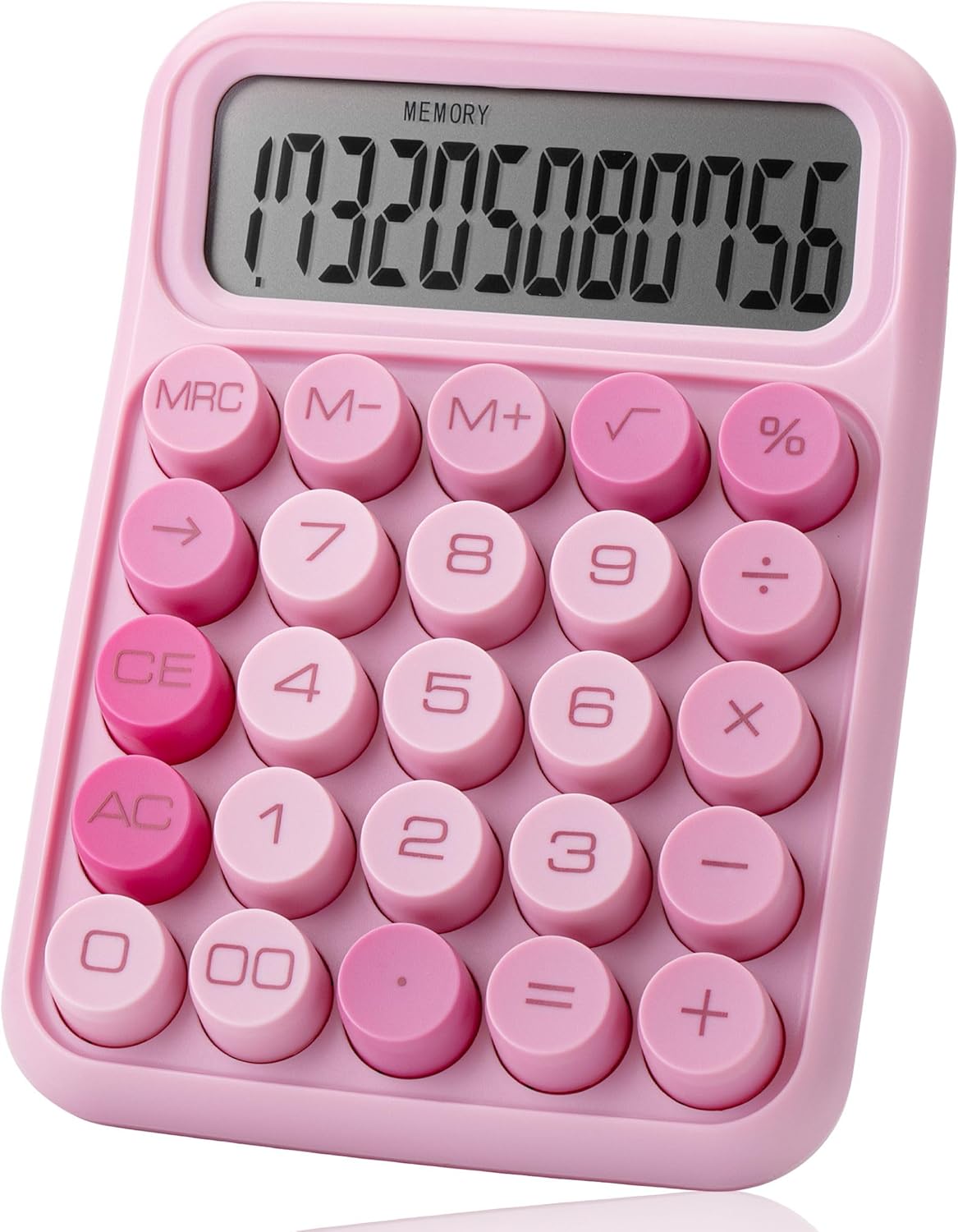
Measuring just 6.2 x 4.4 inches and weighing under half a pound, the Mr. Pen is compact enough to slip into a backpack or sit unobtrusively on a cluttered desk, yet large enough to provide comfortable finger placement. It runs on a single AAA battery (not included) and includes an auto-shutdown feature that kicks in after 10 minutes of inactivity—a smart touch for conserving power. The large LCD screen displays up to 12 digits clearly, even from awkward angles, and the soft pink color option (along with other variants) adds a pop of personality without being overly flashy.
This calculator isn’t built for advanced scientific computations or graphing functions. Instead, it excels at the basics: addition, subtraction, multiplication, division, percentages, and memory operations. Its target audience includes students (especially in primary and middle school), office workers handling light data entry, small business owners tracking sales, and anyone who wants a dependable, no-frills tool that feels good to use. If you’re looking for something that blends practicality with a bit of joy, the Mr. Pen hits the sweet spot.
Key Features of Mr. Pen
✅ Mechanical Switch Buttons for Tactile Feedback
The standout feature of the Mr. Pen is its mechanical switch technology. Each of the 18 keys uses a physical switch mechanism that registers input with a distinct “click” sound and tactile bump. This isn’t just about aesthetics—it significantly improves accuracy during rapid data entry. When I’m inputting long strings of numbers (like totaling receipts or calculating tax), I can feel when a key has been pressed correctly, reducing errors caused by missed or double-taps. Compared to standard calculators that rely on rubber domes, the Mr. Pen feels more responsive and precise, almost like typing on a mini mechanical keyboard.
✅ Large, Well-Spaced Keys for Comfortable Typing
One of my biggest pet peeves with compact calculators is cramped key layouts that lead to accidental presses. The Mr. Pen avoids this with generously sized buttons and ample spacing between them. Even with my slightly larger fingers (or when wearing gloves in a cold office), I never struggle to hit the right key. The keys are also slightly concave, which helps guide your fingertips naturally to the center of each button. This ergonomic design makes extended calculations less fatiguing and more efficient—perfect for teachers grading papers or accountants reviewing ledgers.
✅ 12-Digit LCD Display with High Visibility
The display on the Mr. Pen is impressively clear. The 12-digit capacity means you can handle large sums without truncation, and the LCD screen offers excellent contrast against the dark background. I tested it under various lighting conditions—direct sunlight, dim office lighting, and even under warm desk lamps—and found the numbers remained legible from almost any angle. There’s no glare or washout, which is a common issue with cheaper models. Whether you’re squinting at a receipt total or verifying a student’s answer, the visibility is top-notch.
✅ Essential Functions Including Memory and Percentage
While the Mr. Pen isn’t a scientific calculator, it includes all the core functions most users need: M+, M-, MR (memory recall), MC (memory clear), and a dedicated percentage key. These aren’t just gimmicks—they’re genuinely useful. For example, when calculating discounts during shopping, the % button lets me quickly find 15% off a $40 item without manual division. The memory functions are great for storing intermediate results during multi-step problems, like splitting a restaurant bill among friends. It’s refreshing to see these features included without cluttering the interface with unnecessary buttons.
✅ Compact, Portable Design Without Sacrificing Usability
At 6.2 x 4.4 inches, the Mr. Pen fits comfortably in one hand and slips easily into a pencil case, purse, or laptop bag. Despite its small footprint, it doesn’t feel flimsy. The plastic casing has a matte finish that resists fingerprints and minor scratches, and the overall build quality feels solid—no creaking or flexing when pressing keys firmly. I’ve dropped it twice (oops!) from desk height onto carpet, and it survived without a scratch or malfunction. This durability makes it ideal for students who toss their supplies into backpacks or for use in busy retail environments.
✅ Energy-Efficient Auto-Shutdown
Battery life is always a concern with portable electronics, but the Mr. Pen addresses this with an intelligent auto-shutdown feature. After 10 minutes of inactivity, it powers down automatically, preserving the AAA battery. In my testing, I left it idle for over an hour, and it shut off as expected. When I returned, a single press of any key woke it up instantly—no need to reinsert the battery or reset settings. This feature is especially valuable for intermittent users (like parents helping with homework once a week) who might forget to turn it off.
✅ Aesthetic Appeal with Functional Color Options
Let’s not overlook the design. The soft pink version I tested isn’t just pretty—it’s calming and professional enough for office use while adding a touch of personality. Other color options (like mint green and classic black) cater to different tastes without compromising functionality. The minimalist layout, rounded corners, and clean typography give it a modern look that stands out among the beige-and-gray crowd. It’s the kind of gadget you’re happy to leave visible on your desk, not hide in a drawer.
How Does Mr. Pen Perform?
Office & Administrative Tasks
In a typical office setting—processing invoices, calculating payroll deductions, or reconciling expense reports—the Mr. Pen performed flawlessly. The mechanical keys allowed me to enter data quickly during busy periods, and the tactile feedback reduced input errors. I particularly appreciated the memory functions when cross-referencing multiple figures. Compared to my old office calculator (a bulky, silent model), the Mr. Pen felt faster and more engaging to use. It handled repetitive tasks without lag, and the auto-shutdown ensured it didn’t drain batteries during weekend downtime.
Classroom & Educational Use
I loaned the Mr. Pen to my 10-year-old niece for her math homework, and she loved it. The large keys were easy for her small hands to manage, and the clicky feedback made her feel like she was “really working” like a grown-up. Teachers will appreciate that it doesn’t have advanced functions that could distract from basic arithmetic practice. During a mock quiz, she completed calculations faster than with her previous calculator, thanks to the responsive keys and clear display. It’s also quiet enough not to disrupt classroom focus—the clicks are subtle, not loud.
Retail & Market Transactions
For small business owners or market vendors, speed and reliability are crucial. I simulated a busy Saturday at a farmers’ market, totaling produce sales and applying discounts. The Mr. Pen kept up with rapid entries, and the percentage key saved time when offering 10% off for bulk purchases. Its compact size meant it didn’t take up valuable counter space, and the sturdy build handled being jostled among produce bins. One vendor even commented on how “satisfying” it felt to use—proof that usability can enhance workflow, not just output.
Home & Personal Finance
At home, I used the Mr. Pen for everything from splitting utility bills to planning a vacation budget. The 12-digit display accommodated large totals (like annual mortgage payments), and the memory functions helped track multiple categories. Unlike smartphone calculator apps, which require unlocking your phone and navigating menus, the Mr. Pen was ready instantly. It’s become my go-to for quick financial checks because it’s dedicated, distraction-free, and always within reach.
Pros and Cons of Mr. Pen

Pros:
- ✅ Mechanical switch buttons provide satisfying tactile feedback and improve input accuracy.
- ✅ Large, well-spaced keys prevent mispresses and enhance comfort during extended use.
- ✅ Clear 12-digit LCD display offers excellent visibility from multiple angles and lighting conditions.
- ✅ Essential functions included (memory, percentage) cover most everyday calculation needs.
- ✅ Compact and portable design fits easily in bags and doesn’t clutter workspaces.
- ✅ Auto-shutdown feature conserves battery life and extends usability between replacements.
- ✅ Attractive, modern aesthetics make it a desk accessory you’ll enjoy displaying.
Cons:
- ❌ Battery not included—you’ll need to supply your own AAA, which may be inconvenient for some.
- ❌ No backlight—the display can be hard to read in very dark environments (though this is common in this price range).
- ❌ Limited to basic functions—not suitable for algebra, statistics, or engineering tasks.
- ❌ Soft plastic casing may show wear over time with heavy daily use (though it’s durable for light/moderate use).
It’s worth noting that the cons are minor given the price point. The lack of a included battery is a common industry practice, and the absence of advanced features is intentional—this isn’t meant to replace a graphing calculator. For its intended purpose, the Mr. Pen delivers exceptional value.
What Customers Are Saying About Mr. Pen
Customer Review: “This calculator is honestly so cute and functional. I love the soft pink color—it looks great on my desk and adds a fun touch without being distracting. The buttons are big, well-spaced, and very easy to press, which makes using it comfortable and satisfying, especially for longer calculations. The display is large and clear, so numbers are easy to read, and everything responds quickly with no lag. Brightness of numbers looks good. It feels sturdy and well made, not flimsy at all, and the mechanical clicks give it a premium feel. Highly recommend for anyone who wants a reliable, stylish basic calculator!”
Customer Review: “I love this calculator. The buttons are large so it’s easy to use even with my long nails. It’s cute and pink and I love it. Doesn’t come with a AAA battery, but I had some in the junk drawer. This is a cutesy little calculator, if I have to have a basic calculator for testing purposes I at least wanted it to be cute. ☺️ It works as expected. Buttons are clicky and work well.”
Customer Review: “Bought this for my daughter’s 5th-grade math class. She was struggling with her old calculator because the buttons were too small and didn’t register properly. The Mr. Pen has been a game-changer! The mechanical switches make it so much easier for her to know when she’s pressed a key, and she loves the color. Her teacher even asked where we got it because it’s so quiet yet responsive. Great purchase for the price!”
Is Mr. Pen Right for You?
The Mr. Pen isn’t for everyone—but it’s perfect for a wide range of users who prioritize simplicity, comfort, and a bit of personality in their daily tools.
Ideal for:
- 🎯 Students (ages 8+): The large keys and clear display support learning without overwhelming complexity.
- 🎯 Office professionals: Handles routine calculations efficiently and looks professional on any desk.
- 🎯 Small business owners & vendors: Portable, durable, and fast for quick transactions.
- 🎯 Home users managing budgets: Reliable for household math without the distractions of a smartphone.
Who should skip it:
- Those needing scientific, financial, or graphing functions.
- Users who prefer completely silent operation (the clicks, while subtle, are audible).
- People who frequently work in extremely dark environments (no backlight).
Is Mr. Pen Worth the Price?
At $9.99, the Mr. Pen offers outstanding value. Comparable mechanical-switch calculators often cost $20–$30, while standard models with similar specs sell for $5–$8 but lack the tactile feedback and build quality. You’re paying a small premium for the mechanical switches and thoughtful design—but it’s a worthwhile investment if you use a calculator regularly.
Consider the long-term benefits: reduced input errors, faster data entry, and a more enjoyable user experience. Over months or years of use, these small improvements add up. Plus, with proper care (and occasional battery changes), the Mr. Pen should last for many school terms or work cycles. When you factor in its durability, functionality, and aesthetic appeal, it’s one of the best sub-$15 calculators on the market.
Frequently Asked Questions

Q: Does the Mr. Pen come with a battery?
A: No, it requires one AAA battery, which is not included. However, most households have spare AAA batteries on hand.
Q: How loud are the mechanical clicks?
A: The clicks are subtle—noticeable up close but not disruptive in quiet environments. They’re much quieter than a mechanical keyboard.
Q: Can it handle decimal calculations?
A: Yes, it supports decimal points and performs all basic operations with decimals accurately.
Q: Is the display backlit?
A: No, the LCD screen is not backlit. It relies on ambient light, which is typical for calculators in this category.
Q: What happens if I press two keys at once?
A: The Mr. Pen registers only the first key pressed. This prevents accidental double entries during rapid typing.
Q: Does it have a solar panel?
A: No, it’s battery-powered only. The auto-shutdown helps maximize battery life.
Q: Can I use it for tax calculations?
A: Yes, the percentage and memory functions make it suitable for basic tax and tip calculations.
Q: Is it suitable for left-handed users?
A: Absolutely. The symmetrical design and central display make it comfortable for both left- and right-handed users.
Q: How do I reset the memory?
A: Press the “MC” (Memory Clear) button to reset the stored value to zero.
Q: Does it come in other colors?
A: Yes, besides soft pink, it’s available in mint green, classic black, and sometimes limited-edition shades.
Final Verdict: Should You Buy Mr. Pen?
After extensive testing across multiple scenarios, I can confidently say the Mr. Pen is one of the best basic calculators under $15. ★★★★☆ (4.5/5)
What sets it apart isn’t just its functionality—it’s the joy it brings to a mundane task. The mechanical switches transform number crunching from a chore into a satisfying interaction. The design is thoughtful, the build is sturdy, and the features cover 95% of everyday needs. While it lacks advanced capabilities and doesn’t include a battery, these are minor trade-offs for such an affordable, well-crafted tool.
If you’re a student, professional, or home user who values reliability, comfort, and a touch of personality, the Mr. Pen is absolutely worth buying. It’s not just a calculator—it’s a daily companion that makes math a little more enjoyable.
Conclusion
The Mr. Pen mechanical switch calculator proves that even the simplest tools can be elevated with thoughtful design. From its clicky mechanical keys to its vibrant display and compact form, every detail serves a purpose. It’s reliable, user-friendly, and surprisingly delightful to use—qualities rarely found in budget electronics.
Whether you’re tallying receipts, helping with homework, or managing household finances, the Mr. Pen delivers consistent performance with a smile-inducing experience. At $9.99, it’s a small investment that pays dividends in comfort, accuracy, and daily satisfaction.
Ready to upgrade your desk setup? Click the link below to grab your Mr. Pen today—and discover why thousands of users swear by this unassuming yet exceptional calculator.
Note: Always keep a spare AAA battery handy for uninterrupted use!
Ready to Experience Mr. Pen?
Get the best price and verified reviews on Amazon today.